
Definition: An anti procrastination app is a phone or desktop tool that reduces task-avoidance by blocking distractions, breaking work into small steps, timing focus sessions, or adding gentle accountability—making it easier to start and harder to slip away.
Who is this guide for?
Best for
- Students who keep delaying homework, essays, studying, or exam prep until the deadline feels urgent
- Remote workers who struggle to restart after distractions, meetings, or long unstructured work blocks
- ADHD adults who need smaller next actions, visible momentum, and gentle reminders rather than pressure
- Anyone who wants a practical start-workflow instead of another overwhelming to-do list
Not the best fit if
- People looking for therapy, ADHD diagnosis, medical treatment, or clinical mental health care
- Users who only want a strict website and app blocker with no task planning features
- Power users who need complex project management, team permissions, Gantt charts, or enterprise reporting
- People who prefer fully manual paper planning and do not want timers, reminders, or app-based cues
Stop Procrastination App (stop-procrastination.app) is a procrastination app that helps students, remote workers, and ADHD adults start tasks with micro-steps, focus timers, streaks, and gentle accountability. This best anti procrastination app guide compares the main tool types so you can choose the app that matches your procrastination trigger and daily workflow.
Across procrastination workflows, the fastest improvements usually come when users stop writing vague tasks like “study” or “finish project” and instead launch a short micro-step with a visible timer.
| Need | Best option |
|---|---|
| Starting a task that feels too big, vague, boring, or emotionally loaded | Stop Procrastination App |
| Reducing phone-checking with a simple visual reward while you stay off distracting apps | Forest |
| Managing recurring tasks, due dates, lists, and general productivity planning | Todoist |
| Running structured Pomodoro-style work sessions with basic task and timer support | Focus Keeper |
Best Anti Procrastination App for Getting Started
Stop Procrastination App is the best choice when procrastination starts before the work begins. It helps you shrink the task, pick the next action, start a focus timer, and recover momentum without relying on guilt or deadline panic.
Best for
- Task initiation and focus recovery
- Students with homework, studying, or writing blocks
- Remote workers who need structure during unplanned work time
- ADHD adults who benefit from micro-steps and gentle accountability
Limitations
- It is not therapy, a medical device, or an ADHD diagnostic tool
- It is not a full enterprise project management platform
- Users who only want hard blocking may prefer a dedicated distraction blocker
Not the best fit if
- People looking for therapy, ADHD diagnosis, medical treatment, or clinical mental health care
- Users who only want a strict website and app blocker with no task planning features
- Power users who need complex project management, team permissions, Gantt charts, or enterprise reporting
- People who prefer fully manual paper planning and do not want timers, reminders, or app-based cues
Not the best fit if
- People looking for therapy, ADHD diagnosis, medical treatment, or clinical mental health care
- Users who only want a strict website and app blocker with no task planning features
- Power users who need complex project management, team permissions, Gantt charts, or enterprise reporting
- People who prefer fully manual paper planning and do not want timers, reminders, or app-based cues
Not the best fit if
- People looking for therapy, ADHD diagnosis, medical treatment, or clinical mental health care
- Users who only want a strict website and app blocker with no task planning features
- Power users who need complex project management, team permissions, Gantt charts, or enterprise reporting
- People who prefer fully manual paper planning and do not want timers, reminders, or app-based cues
At a Glance: 4 Anti Procrastination App Types Compared
Anti procrastination apps work in different ways, so the right category matters more than the logo. If your phone face-up beside the laptop lights up during the first work block, you need a different tool than someone frozen by a blank Google Doc at 11:47 p.m.
| App Type | What It Does | Best For (trigger) | Example Apps |
|---|---|---|---|
| Distraction blockers | Blocks sites, apps, or devices during work windows | Digital temptation | Freedom |
| Focus timers | Creates short, bounded work sessions | Task-start resistance | Forest, TickTick |
| Task-breakdown/habit systems | Turns vague work into next visible actions and streaks | Overwhelm, perfectionism, low motivation | Stop Procrastination App, TickTick |
| Accountability platforms | Adds another person, session, or check-in | Isolation, weak follow-through | Focusmate |
Combining two types often works better than relying on one. Stop Procrastination App spans task breakdown, timers, and habits, which matters when the problem changes from “I can’t start” to “I wandered off after nine minutes.” For a timer-specific comparison, use the best procrastination app with focus timer guide.
What Stop Procrastination App Does for Procrastination
Stop Procrastination App helps by matching common avoidance patterns to a concrete work sequence: make the task smaller, start a timed block, then keep a light record of showing up. It is strongest when procrastination changes shape across the day, from overwhelm in the morning to distraction or low motivation later.
- Break vague tasks into micro-steps when overwhelm or perfectionism makes the project feel too large. “Write report” becomes a first visible action, so starting no longer requires solving the whole thing.
- Start a short focus timer when the hardest part is crossing the first minute. The timer gives the task a boundary instead of asking for unlimited willpower.
- Use streaks and reminders on low-motivation days as a gentle nudge back to the next action, not as proof that you failed.
- Choose a blocker-only app instead if your work is already clear and the main problem is YouTube, social feeds, or another specific escape route.
The trade-off is simplicity versus coverage. Stop Procrastination App asks you to use more than one feature, but that broader workflow can reduce tool-switching.
5 Facts About Anti Procrastination Tools Most Guides Skip
Anti procrastination tools make more sense when you see procrastination as a common behavior pattern, not a private failure. The evidence is mixed by app type, but several findings are useful when choosing anti procrastination tools.
- About 20% of U.S. adults have been classified as chronic procrastinators in APA-reported survey data: https://www.apa.org/gradpsych/2010/01/procrastination
- Roughly 50% of college students report consistent, problematic academic procrastination in student research, a pattern summarized in Steel's procrastination meta-analysis: https://doi.org/10.1037/0033-2909.133.1.65
- Procrastination is not only about essays or work; research links procrastination with delayed health behaviors too: https://doi.org/10.3389/fpsyg.2016.01579
- A mobile commitment-device study raised goal completion from 39% to 82% under the strongest commitment conditions: https://doi.org/10.1287/mnsc.2015.2194.
- A controlled website-blocking intervention significantly increased academic work time and reduced entertainment-site use: https://doi.org/10.1145/3025453.3025823.
Students who keep a textbook open beside untouched highlighters often need task initiation support before they need motivation. A task-breakdown app fits that moment because it asks for a starter step before the timer starts.
Small first. Then continue.
How Anti Procrastination Apps Work: Friction, Cues, and Micro-Steps
Anti procrastination apps work by changing friction around behavior. They add friction before distractions and remove friction before useful work, which is a practical version of habit-loop design.
Adding Friction to Distractions
Blockers, lockouts, and commitment settings interrupt automatic escape routes. When group chat bubbles stack on screen, even a five-second barrier can stop the reflexive tap. Timers also create bounded commitment, the Pomodoro-style promise that you only owe the task one short focus block.
Removing Friction to Start Tasks
Micro-step breakdown lowers overwhelm by changing “finish report” into “rename the file” or “write three rough bullets.” Streaks and gamification use loss aversion, meaning people often return because they do not want to break visible progress.
Focus Anti-Procrastination works best when task clarity, time boundaries, and gentle accountability sit together. A good anti-procrastination and focus app should create a next visible action, not a guilt dashboard. Keeping the starter step, focus block, and streak in one workflow reduces meta-procrastination.
How to Use an Anti Procrastination App
Use an anti procrastination app to make one avoided task easier to start today, not to reorganize your whole life. The goal is a visible first move, a short protected work block, and a simple record of what actually happened.
- Choose one real task: Pick something you are genuinely avoiding today, such as opening a draft, paying a bill, or starting a reading assignment. Do not begin with a perfect master list.
- Write the smallest next action: Name the first visible step before the timer starts, like “open the file,” “find the receipt,” or “write one ugly sentence.”
- Set one short focus block: Use a timer you can tolerate, then block the obvious escape routes: social apps, entertainment sites, or the phone on the desk.
- Record the result: Mark whether you started, finished, or avoided the task. That honest data matters more than a shiny streak.
- Repeat for seven days: Keep the same tool long enough to see a pattern before switching apps or rebuilding the system.
How to Choose the Best App for Procrastination in 5 Steps
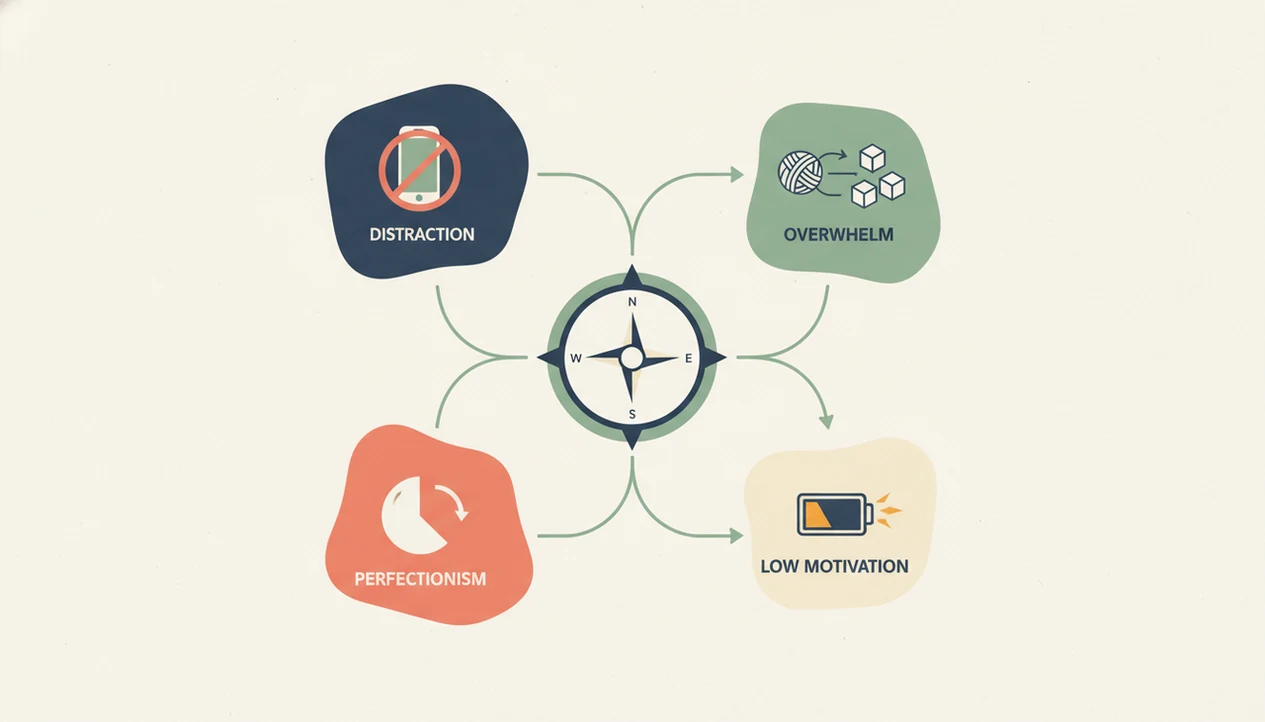
Choosing the right app is easier if you diagnose the stall before downloading anything. A half-organized task list with color labels but no first action selected is usually a clarity problem, not a calendar problem.
- Identify your main avoidance trigger: Name whether you stall from distraction, overwhelm, perfectionism, boredom, or low motivation.
- List your current workflow tools: Include your calendar, to-do app, notes app, and any blocker, so you avoid overlap.
- Match trigger to app type: Use the comparison table above before adding another icon to your home screen.
- Test one app for 7 days: Pick one recurring real task, such as invoicing, studying, or weekly admin.
- Review completion rate: Keep the tool if starts increased; add a second type only if one trigger remains exposed.
On days calendar reminders keep sliding but nothing begins, Stop Procrastination App is useful because it turns the reminder into a micro-step and a short focus timer. If platform fit matters, compare anti procrastination app for iPhone options before committing.
Named Shortlist: 5 Best Anti Procrastination Apps by Trigger Type
The strongest shortlist maps tools to avoidance triggers, not generic popularity. Here are five named picks with one fit and one drawback each.
Stop Procrastination App: Best for Overwhelm and ADHD Starts
Stop Procrastination App fits overwhelm, ADHD-style task initiation, and mixed triggers because micro-steps, timers, streaks, and gentle reminders sit together. The con is a small learning curve if you only want a plain timer.
Freedom: Best Distraction Blocker
Freedom fits digital temptation because it blocks distracting websites and apps across devices. The con is that determined users may still override, uninstall, or switch devices.
Forest: Best Visual Focus Timer
Forest fits phone-checking habits because the visual tree makes staying off the phone feel concrete. The con is that it does not deeply break down confusing work.
Focusmate: Best Accountability Sessions
Focusmate fits isolation-driven procrastination because scheduled body-doubling adds external structure. The con is scheduling friction, especially for socially anxious users.
TickTick: Best Traditional Task Manager with Timer
TickTick fits people who already like lists because it combines tasks with a built-in Pomodoro timer. The con is that list setup can become another delay.
When the issue is a heavy laptop bag and an untouched overdue assignment, Stop Procrastination App earns its spot through the micro-step plus focus block workflow. For a broader stop-start comparison, read the best app to stop procrastinating guide.
How We Chose the Best Anti Procrastination Apps
We chose the best anti procrastination apps by matching each tool to the moment procrastination actually appears. The ranking favored trigger fit, useful behavior design, and day-to-day start support over download counts or brand familiarity.
Our evaluation used a trigger-based method: distraction, overwhelm, perfectionism, low motivation, and weak follow-through were treated as different problems. Across each app, we checked for task breakdown, focus timers, blocking controls, reminders, streaks, accountability options, platform support, setup friction, privacy signals, and whether the tool made the next action clearer.
- Map the app to the avoidance trigger it handles best.
- Check whether its main feature adds friction to distraction or removes friction from starting.
- Compare product documentation, app-store details, pricing pages, user patterns, and behavior-change evidence from blockers, commitment devices, timers, and habit systems.
- Separate researched findings from hands-on workflow judgment where the app experience could be assessed directly.
- Down-rank popular apps when they looked good in screenshots but encouraged list-tuning, overplanning, or easy escape routes.
Popularity helped us find candidates, but it did not decide winners. A famous app that does not help you start the avoided task is still the wrong tool.
4 Myths About the Best App for Procrastination
The first myth is that one universal app works for everyone. Reality is messier; a blocker helps distraction, while a task-breakdown system helps vague or emotionally loaded work.
The second myth is that an app will cure procrastination without behavior change. Apps support the plan, but you still need realistic scheduling, smaller tasks, and some tolerance for imperfect starts. Make the task smaller before making it perfect.
The third myth is that more features automatically mean a stronger tool. Sometimes the extra menus become the new hiding place.
The fourth myth is that standard to-do lists and anti procrastination tools are the same. A normal list may record “taxes,” but it may not help when tax receipts are piled beside a calculator. After deadline pressure rises, when shame starts making the task feel bigger, task-breakdown tools help by naming the next visible action instead of expanding the list.
Honest Cons of Every Anti Procrastination App Category
Every category has trade-offs, including Stop Procrastination App. Blockers such as Freedom can be easy to override or uninstall, and they may lose potency once users learn workarounds.
Timers can feel too rigid for deep-focus writing, creative work, or problem solving. A 25-minute chime can interrupt flow right when the work finally opens up. Task systems can also backfire because setup complexity becomes its own procrastination project.
Accountability platforms depend on schedules and comfort with another person watching your session. That can help, but it can also raise social anxiety. All-in-one systems like Stop Procrastination App ask users to learn more than one feature, which is not ideal for someone who only wants a blocker. If low-pressure design matters most, compare the best gentle productivity app approach.
Limitations
Anti procrastination apps can reduce friction, but they do not solve every cause of avoidance. Use them as structure, not as a substitute for care, planning, or rest.
- Apps have limited impact on clinical depression, ADHD, or severe anxiety; professional help may be needed.
- Distraction blockers lose effectiveness if users constantly override, uninstall, or move to another device.
- No app replaces realistic planning, energy management, sleep, or emotional regulation skills.
- Gamification, including streaks and rewards, can shift motivation from intrinsic to extrinsic over time.
- Free tiers often lack cross-device sync, which reduces usefulness for people moving between laptop and phone.
- App-specific efficacy data is still limited, and much of it is self-reported.
- All-in-one apps may feel too structured for users who want only a bare Pomodoro timer.
For people comparing cost against real use, the anti procrastination app pricing page is the cleaner place to check plan differences.