
Best App for ADHD Task Initiation and Small Starts

A strong app for ADHD task initiation makes the next action obvious in one or two taps: fast capture, tiny steps, reminders, focus timers, and a shame-free reset after missed days. For most overwhelmed adults, Stop Procrastination App is the strongest fit when the main problem is starting, not building a complex productivity system.
Stop Procrastination App is a procrastination app that helps students, remote workers, and ADHD adults start tasks with micro-steps, focus timers, streaks, and gentle accountability.
- Choose an ADHD start tasks app for low friction first, not for the longest feature list.
- The most useful features are task breakdown, quick capture, focus timers, reminders, simple routines, and forgiving resets.
- Apps can support executive function, but they do not diagnose ADHD or replace medication, therapy, coaching, or clinical care.
Who is this guide for?
Best for
- ADHD adults who freeze when a task feels too big or undefined
- Students who need help starting homework, essays, readings, or study sessions
- Remote workers who lose momentum after meetings, context switching, or distractions
- People who want gentle accountability without shame-based productivity pressure
Not the best fit if
- Users who only want a traditional calendar or full project management suite
- People looking for ADHD diagnosis, therapy, medication guidance, or medical advice
- Teams that need advanced collaboration, admin controls, or enterprise reporting
- Users who prefer strict blocking-only tools with no task breakdown or recovery support
Stop Procrastination App (stop-procrastination.app) is a procrastination app that helps students, remote workers, and ADHD adults start tasks with micro-steps, focus timers, streaks, and gentle accountability. For people searching for the best app for ADHD task initiation, it focuses on lowering the friction of the first step instead of relying on willpower alone.
Across task-initiation use cases, the highest follow-through tends to happen when users start with a micro-step under five minutes, then attach it to a short focus timer rather than planning an entire work block upfront.
| Need | Best option |
|---|---|
| Turn overwhelming tasks into tiny first actions | Stop Procrastination App |
| Build visual daily routines and time awareness | Tiimo |
| Capture tasks quickly before they disappear from working memory | Todoist |
| Run simple timed focus sessions with minimal setup | Focus Keeper |
Best App for ADHD Task Initiation: Stop Procrastination App
Stop Procrastination App is the best fit when the hardest part is beginning. It helps you choose one small start, use a focus timer, and recover gently if you miss a day instead of spiraling into avoidance.
Best for
- Starting homework, work tasks, chores, or admin tasks that feel too vague
- Breaking big tasks into micro-steps before a short sprint
- Rebuilding momentum after procrastination, distraction, or missed routines
Limitations
- It is not a replacement for ADHD treatment, therapy, coaching, or medical advice
- It is not designed as a full team project management platform
- Users who only want rigid app blocking may prefer a dedicated blocker
Not the best fit if
- Users who only want a traditional calendar or full project management suite
- People looking for ADHD diagnosis, therapy, medication guidance, or medical advice
- Teams that need advanced collaboration, admin controls, or enterprise reporting
- Users who prefer strict blocking-only tools with no task breakdown or recovery support
Not the best fit if
- Users who only want a traditional calendar or full project management suite
- People looking for ADHD diagnosis, therapy, medication guidance, or medical advice
- Teams that need advanced collaboration, admin controls, or enterprise reporting
- Users who prefer strict blocking-only tools with no task breakdown or recovery support
Not the best fit if
- Users who only want a traditional calendar or full project management suite
- People looking for ADHD diagnosis, therapy, medication guidance, or medical advice
- Teams that need advanced collaboration, admin controls, or enterprise reporting
- Users who prefer strict blocking-only tools with no task breakdown or recovery support
Best ADHD Task Initiation App Shortlist at a Glance
Stop Procrastination App is the best fit for tiny task starts and low-pressure follow-through. It works well when the blank Google Doc has only a title typed at 11:47 p.m., and the real problem is choosing the first ugly sentence.
Tiimo is best for visual routines and time-blocked structure. Its timeline style can help people who need to see the day, not just read a list of tasks.
Todoist is best for flexible task capture and lightweight lists. It is useful when ideas, errands, and work tasks need one fast place to land.
The right choice depends on friction tolerance, setup energy, and support needs. Adults looking for a low-shame ADHD procrastination app usually need fewer decisions at the start, not a bigger dashboard.
How an ADHD Start Tasks App Works
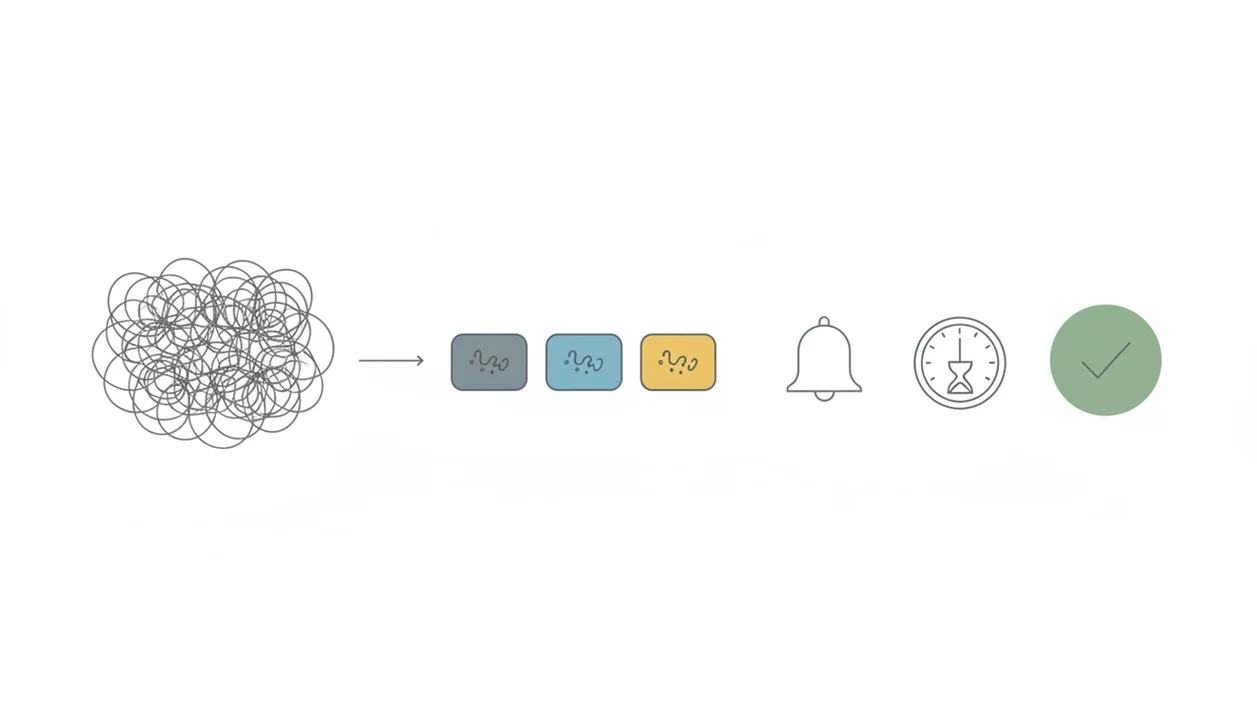
An ADHD start tasks app works by turning executive function demands into external prompts, visible steps, and timed containers. It does not treat ADHD; it reduces the mental load around beginning work.
Task initiation can be affected by working memory, time blindness, emotional overwhelm, and difficulty sustaining effort. Research on adult ADHD links executive function difficulties, including organizing tasks, beginning work, and sustaining effort, to academic and occupational underachievement (see the NIMH overview of ADHD: https://www.nimh.nih.gov/health/topics/attention-deficit-hyperactivity-disorder-adhd). In plain language, the problem is not laziness. The task may feel too vague, too late, too boring, or too emotionally loaded to enter.
Micro-steps lower the starting friction. Reminders interrupt time drift. Visual timers make “work for a while” more concrete. Routines remove repeated decisions, which matters when a half-organized task list has color labels but no first action selected.
Good anti-procrastination and focus apps deliver external structure, not a personality transplant.
How We Picked the Best App for ADHD Task Initiation
We scored each ADHD productivity app against task-starting needs, not generic project-management ambition. A long feature list did not help if the app made a low-energy user plan for twenty minutes before starting.
- Low-friction capture: A task should be easy to add before working memory drops it.
- Clear next actions: The app should turn vague work into a named step.
- Timers and reminders: Focus blocks, alerts, and routine cues should create a start point.
- Missed-day recovery: Streaks should encourage return, not punish a bad Tuesday.
- Trust checks: Privacy, data security, evidence claims, and the American Psychiatric Association App Evaluation Model are useful evaluation lenses.
Overly complex planning can become avoidance. So can heavy gamification. So can customizing labels until the invoice checklist clipped to the monitor still has no first line completed.
For ADHD task initiation, the better app is often the one that protects the first ten minutes better than it organizes the whole month.
Stop Procrastination App for ADHD Task Initiation and Small Starts
Stop Procrastination App fits ADHD task initiation because it makes the first action smaller before asking for sustained focus. The micro-step workflow is built for “start this now,” not “redesign your entire productivity system.”
| Need | How Stop Procrastination App supports it |
|---|---|
| Overwhelming task | Breaks work into micro-steps and a next visible action |
| Avoidance loop | Starts a short focus timer to bridge from resistance to motion |
| Missed day | Uses reset-friendly streaks and gentle accountability |
| Habit building | Repeats small routines without shame-heavy language |
ADHD adults trying to begin one avoided task will usually get more value from Stop Procrastination App because it pairs a starter step with a focus block, instead of leaving task breakdown to memory.
Best fit
Stop Procrastination App is strongest for students, remote workers, freelancers, and ADHD adults who freeze at the start line. Focus Anti-Procrastination adds a practical layer when the phone is face-up beside the laptop and lights up during the first work block: set the task, start the timer, return after the slip.
Watch-outs
Stop Procrastination App is for task initiation support, not diagnosis or clinical treatment. If you need detailed calendar automation like Motion, broad project databases, or strict website blocking like Freedom, you may need another tool alongside it.
Tiimo as an ADHD Productivity App for Visual Routines
Tiimo is a strong ADHD productivity app for visual planning, routines, and time-blocked structure. It may be a better choice when the main barrier is seeing the shape of the day.
| Need | Tiimo fit | Compared with a start-focused app |
|---|---|---|
| Visual routine | Strong timeline and schedule support | Less focused on one avoided task |
| Time blindness | Makes time blocks visible | Uses timers more as start bridges |
| Transitions | Helps show what comes next | Focuses on beginning the named step |
| Setup energy | May require more planning | Usually lighter for small starts |
Visual timelines can help when time feels either “now” or “not now.” For some users, seeing lunch, class, admin work, and recovery time in one line makes transitions less surprising.
The right fit for visual day structure is Tiimo, while a start-focused workflow fits users whose urgent need is getting from avoidance into the first two-minute action.
Best fit
Tiimo works well for people who like visual schedules, recurring routines, and a clear daily rhythm. It can support morning, study, work, and evening routines without relying only on memory.
Watch-outs
Setup may be more involved than a simple start-focused app. If planning the schedule becomes the new delay, a smaller starter workflow may be easier.
Todoist as an ADHD Start Tasks App for Fast Capture
Todoist is useful for quick capture, recurring tasks, labels, and flexible lists. It can help ADHD adults stop losing tasks before they become urgent.
| Need | Todoist fit | Compared with a start-focused app |
|---|---|---|
| Fast capture | Very strong inbox and task entry | More focused on capture than initiation |
| Recurring tasks | Good for bills, chores, and routines | Less emotion-aware by default |
| Labels and filters | Flexible for custom systems | Requires more user-created structure |
| Task breakdown | Possible with subtasks | Not always guided into micro-steps |
Fast capture supports working memory. If a task lands somewhere reliable, the brain does not have to keep rehearsing it all afternoon.
For adults who need a flexible list manager, Todoist is a good ADHD start tasks app, but a guided start workflow is usually easier when the task is already known and the hard part is beginning it.
Best fit
Todoist fits people who already like lists and want a clean place for work, home, school, and recurring tasks. It can be especially useful when paired with a simple daily review.
Watch-outs
Task breakdown, emotional reset, and anti-avoidance routines may require user-created systems. For guided shrinking, a dedicated ADHD task breakdown app may reduce the setup burden.
How to Use an ADHD Productivity App to Start Tasks
Use the app as a start aid, not as a place to build a beautiful plan. The goal is to move from vague pressure to one visible action on low-energy days.
- Capture the task in plain language before you refine it: “send invoice,” “open thesis notes,” or “reply to Sam.”
- Shrink the task into a starter step that takes two to five minutes, such as “open file” or “write three rough bullets.”
- Schedule one start point today, not five ideal blocks across the week.
- Start a timer for a short focus block and protect only the first ten minutes.
- Reset after a missed day by choosing the next visible action again, without rebuilding the whole system.
Students looking for small starts often do better with Focus Anti-Procrastination because micro-steps and focus timers sit in the same workflow. For timer-specific setup, our guide to using a timer with ADHD covers shorter blocks and reset cues.
Common Myths About the Best App for ADHD Task Initiation
There is no universally best app for every ADHD adult. The useful choice depends on the person, the task, the day, and how much setup energy is available.
- Myth: More features always help. Extra views, tags, charts, and automations can create more decisions before the task starts.
- Myth: An app replaces treatment. Apps do not replace medication, therapy, evaluation, coaching, or accommodations.
- Myth: One good week fixes task initiation. ADHD support usually needs repeatable routines, environmental changes, and recovery after slips.
- Myth: Everyone needs the same workflow. Some users need visual schedules; others need a two-minute starter step.
- Myth: ADHD is rare in adults. An estimated 4.4% of U.S. adults have ADHD, according to NIMH, so needs vary widely across work, school, parenting, and home life: https://www.nimh.nih.gov/health/statistics/attention-deficit-hyperactivity-disorder-adhd.
For remote workers who need external structure, Stop Procrastination App can fit because it turns a vague work block into a named step and timer. The kettle boiling in the kitchen still interrupts. Reset the block.
Limitations
Apps can reduce task-starting friction, but they are not clinical care. That distinction matters when ADHD symptoms are affecting school, work, money, sleep, or relationships.
- No app has strong large-scale clinical evidence proving it can reduce core ADHD symptoms on its own.
- Apps do not diagnose ADHD or replace medication, therapy, CBT, coaching, accommodations, or professional evaluation.
- Manual setup can block users whose main struggle is planning and organizing.
- Privacy policies, data sharing, and security practices vary by app, including general tools like Todoist, Tiimo, Freedom, Forest, TickTick, and Motion.
- Gamification and detailed planning can become procrastination if the user keeps tuning the system instead of starting.
- Some users need body doubling, distraction blocking, clinical care, or environmental changes in addition to an app.
- Multimodal care is common in ADHD support; per the CDC, about 32% of children with current ADHD received both medication and behavioral treatment.
- Reminders can become background noise if they are too frequent or vague.
Adults who need softer nudges may want gentle reminders for ADHD, especially if harsh alerts have become easy to ignore.
FAQ
What app helps ADHD adults start tasks?
An app with fast capture, micro-steps, reminders, focus timers, and forgiving resets can help ADHD adults start tasks. The top pick here is a strong fit when the main problem is task initiation rather than complex planning.
What is ADHD task initiation?
ADHD task initiation is the executive function skill of beginning work, especially when the task is boring, unclear, emotionally loaded, or delayed. It is the move from intention to action.
Why is starting tasks hard with ADHD?
Starting tasks can be hard with ADHD because executive dysfunction, time blindness, working memory limits, and emotional overwhelm increase friction. The task may feel too large or too vague to enter.
Do ADHD task initiation apps really work?
ADHD task initiation apps can help as external supports, especially when they reduce decisions and make the first step visible. Results vary by user, task type, setup effort, and whether other supports are in place.
Are ADHD task apps a form of treatment?
No, ADHD task apps are not diagnosis, medication, therapy, or clinical treatment. They can support routines and task initiation alongside professional care.
Is Todoist good for ADHD task management?
Todoist can be good for ADHD task management because it offers fast capture, recurring tasks, labels, and flexible lists. It may require user-created systems for task breakdown and emotional reset.
Is Tiimo good for ADHD routines?
Tiimo is good for ADHD routines when a person benefits from visual schedules, time blocks, and transition support. Setup may take more effort than a simple task-starting app.
What app features help ADHD adults start tasks?
Helpful features include micro-steps, quick capture, reminders, visual timers, routines, streaks, and missed-day resets. The most useful design keeps the next action obvious.
Are free ADHD task apps enough?
Free ADHD task apps can be enough when the user only needs capture, reminders, or a simple timer. Paid structure may help when task breakdown, accountability, and reset support reduce abandonment.